AI Ticket Triage for MSPs | Boost Operation Efficiency

Start Your AI Ticket App Trial Today

Try our AI-powered triage, ticket QA, sentiment analysis. Fill out the form and start instantly with 3,000 free credits!

Image

AI Ticket Triage for MSPs

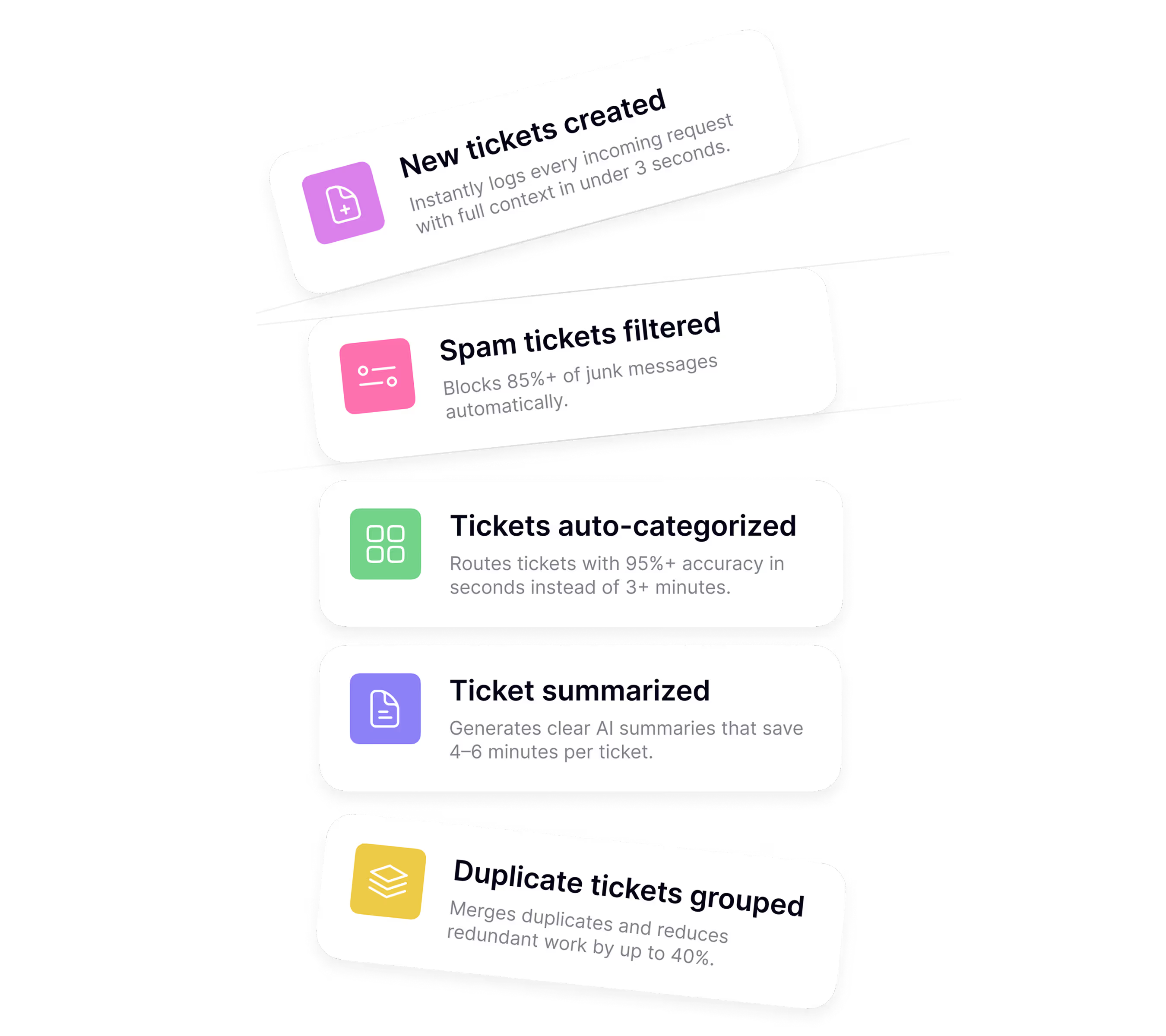
Your coordinators shouldn’t spend 3+ minutes per ticket on repetitive categorization. AI Ticket Triage routes every ticket in seconds, protecting SLAs, optimizing operations, and cutting triage costs.

Enterprise-Grade Security

Built on Microsoft Azure OpenAI for robust data protection and compliance.

Ready in 30 Minutes

Effortless setup with no coding or manual mapping required.

Benefits

Why Choose AI Triage
Over Manual Triage

Transform Your Service Desk Operations.

  • Real-Time Processing

    Tickets get triaged the moment they arrive, not hours later. Every incoming ticket is analyzed and routed within seconds of creation. No more morning backlogs. No more SLA breaches because tickets sat unassigned for 4 hours. Your team sees correctly categorized, priority-assigned tickets the instant they hit the queue.

  • Superior Accuracy & Consistency

    The same ticket gets the same category every single time. No more “it depends who’s triaging today”. AI Triage analyzes ticket content, contact history, and context to deliver consistent categorization that matches your SOPs. Whether it’s 8 AM or 8PM, Tuesday or Friday, urgent or routine, the AI applies the same logic every time.

  • Reduce Labor Cost

    Stop burning coordinator hours on repetitive ticket classification. Your triage coordinators shouldn’t be spending hours per month on admin work that AI can handle instantly. Free them from mechanical sorting to focus on complex escalations, client communication, and high-value tasks that actually require human judgement.

ROI

Calculate Your Savings

Calculate Manual Cost:

$ 45,000 / YEAR

Service Coordinator's Salary

3 MINS / TICKET

Average Triage Time

1,500 TICKETS

Monthly Ticket Volume

Transition to AI Ticket Triage

MSPBots AI Triage:

Calculation Based on Starter Subscription

$ 1,248 Monthly ROI

$ 14,976 Yearly ROI

Team efficiency and overall provided service sky rockets as ticket triage is optimized.

$ 25.96 / HOUR

Labor Cost Savings

Processing Time

INSTANT

75 HOURS

Total Monthly Hours Saved

$ 1,947 / MONTH

Expected Savings

The combination of manual ticket categorization reduced, along with quick talent allocations greatly saves costs over time.

Key Feature That Sets Us Apart

Built for MSPs, by MSPs

Effortless Setup

We spent 6 months setting another tool and it still doesn’t work right. Our team had to manually map 200+ ticket types, we’re still finding miscategorizations.

Setup Under 30 Minutes

Instantly pull in your ConnectWise or AutoTask configurations
AI Triage auto-generates smart default instructions based on your existing PSA setup. No manual mapping. No technical expertise required. Configure routing rules in plain English and start processing tickets the same day.

AI-Powered Context Analysis

AI Triage analyzes the full ticket
It sees patterns your coordinators miss and applies your SOPs consistently, even for vague tickets. Custom prompts let you add specific routing logic for unique scenarios.
 

Intelligent Ticket Categorization

We get tickets that just say ‘HELP’ or ‘Computer broken’ with no details. My coordinators waste time hunting down context before they can even categorize it.

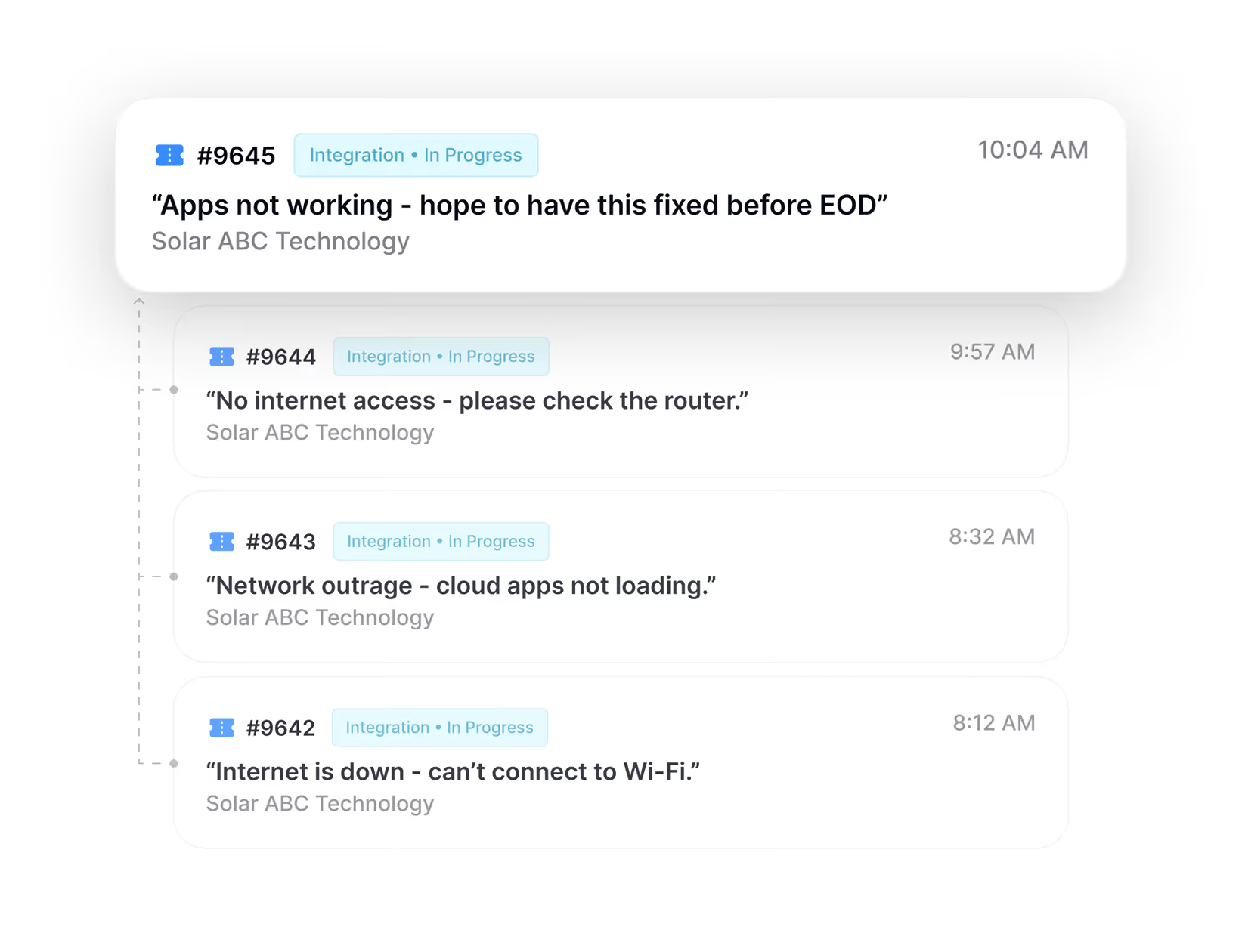
Duplicate Ticket Detection

The same client emails three people about the same issue. Now we have three tickets, three technicians working on it, and overlapping responses that make us look disorganized.
 

Smart Duplicate Bundling

AI automatically detects duplicate tickets within a 2-hour window and bundles them together.
The first ticket gets triaged normally; duplicates are linked to the parent ticket. Your team sees one clear ticket instead of three, preventing wasted effort and duplicate billing. Built-in safeguards ensure problem tickets and change requests never get incorrectly merged.

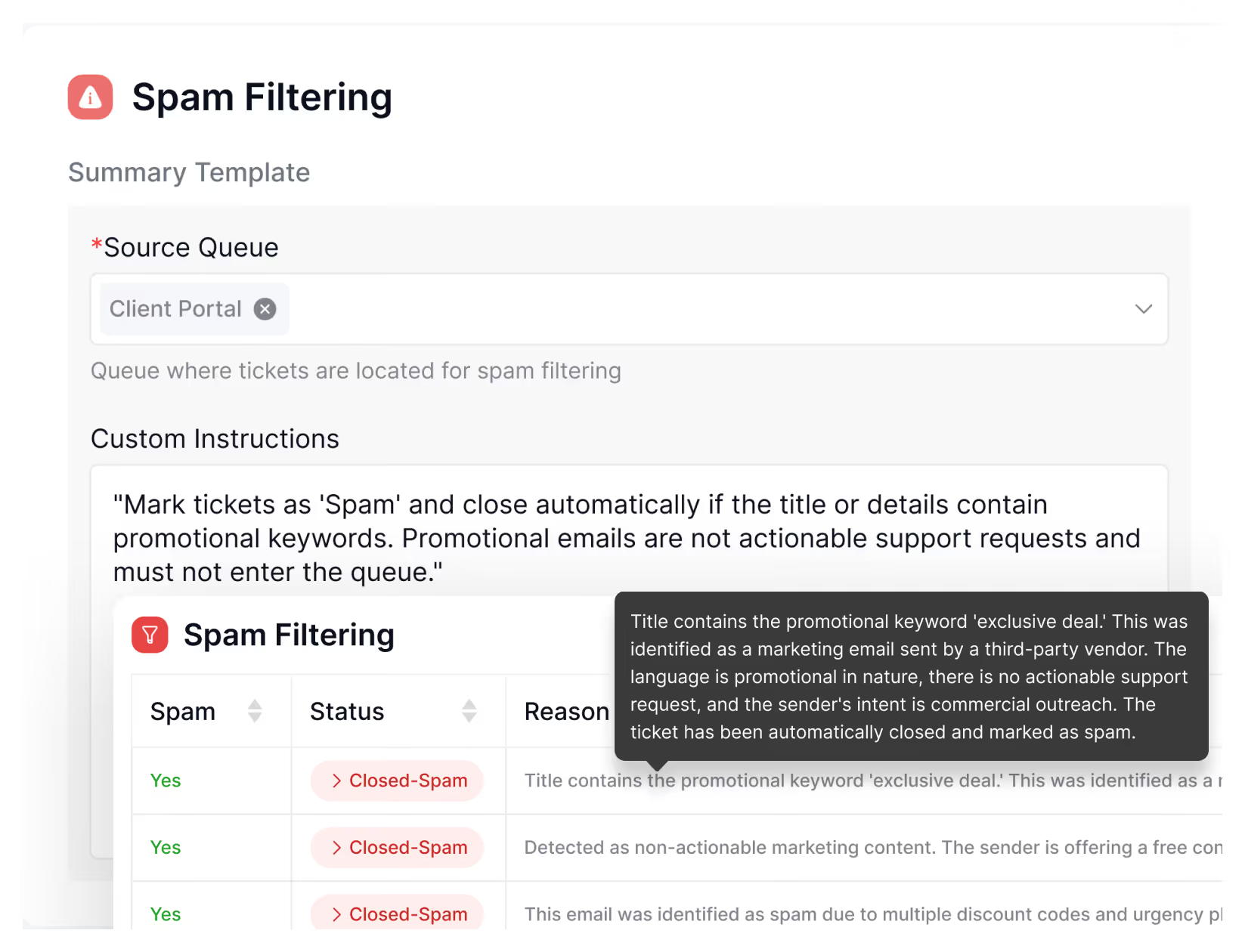
Out-of-the-Box Spam Detection

AI Triage automatically identifies and filters:
Spam tickets are routed to a separate queue or closed automatically of your choice. Optionally target specific catch-all companies where spam is most common. Clean metrics, focused team, zero manual filtering.

Spam Filtering

We get 50+ spam tickets daily, vendor promotions, marketing emails, recruitment messages. Everyone wastes coordinator time and inflates out ticket metrics.

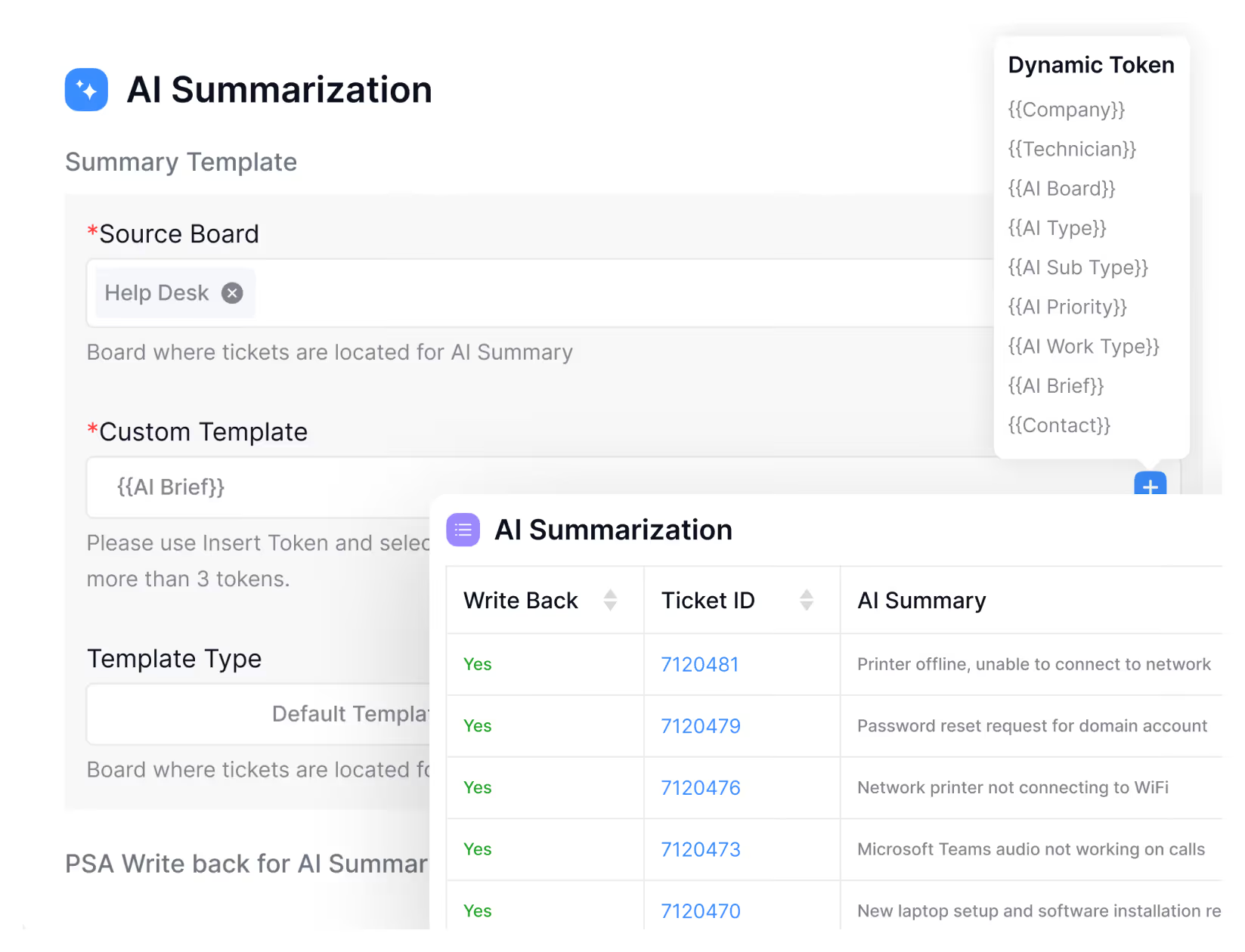
AI-Generated Ticket Summaries

Clients submit tickets with subjects like ‘Issue’ or ‘Help needed’. My technicians waste the first 5 minutes of every ticket just figuring out what the problem actually is.
 

Clear, Actionable Summaries

AI reads the full ticket content and generates a concise summary in plain language.
Technicians see exactly what the issue is, what the client tried, and what they’re requesting, without reading through rambling email threads. You can even rewrite ticket titles with these summaries for better organization.

Microsoft Azure OpenAI Foundation

Built on Microsoft Azure OpenAI with enterprise-grade security architecture.
All data transmitted via HTTPS encrypted channels. Zero retention for model training. Your tickets aren’t used to improve anyone else’s AI. Your client data stays protected and confidential.
 

Enterprise-Grade Security

We can’t use just any AI tool. We need guarantees about data security, compliance, and how our client information is being used.
Compare

Why We Beat the Competition

Triage Solution
MSPbots AI Ticket Triage
Human Service Coordinator
Other Ticket Triage Software
Smart Billing Protection

Hard credit limits
Usage alerts starting at 80%
Auto-stop to prevent surprise charges

-

Risk of surprise high bills from overages or ticket spikes

User-Friendly Design

Natural-language instructions; ideal for non-technical teams

-

Technical configuration required

Setup & Onboarding

No manual mapping
Auto-detects PSA configuration
Go live in 30 minutes

Extensive manual mapping
Time-consuming onboarding

Extensive manual mapping
Time-consuming onboarding

Speed

Instant processing and update (seconds)

3–10 minutes per ticket
Slower during peak hours

Moderate processing time

Accuracy

Consistent classification and routing

Prone to misroutes, duplicates, and inconsistent standards

Depends on rule quality

Scalability

Can handle thousands of tickets simultaneously

Limited by headcount
Bottlenecks at high volume

Prone to outdated configuration and logic

Cost Efficiency

Low per-ticket cost
No overhead or turnover
Scales affordably

Full-time salaries
Training and benefits costs
High turnover

Higher per-credit or per-ticket pricing
Costs rise quickly

Availability

24/7, 365 days
No breaks or downtime

Business hours only
Unavailable on breaks

Security & Compliance

Built on Microsoft Azure OpenAI for enterprise-grade data protection
SOC 2 Type II certified

Human error risks (i.e. missed sensitive information, misrouted data, etc)

Inconsistent compliance
Security depends on vendor

Testimonials

Real-World Impact From Our Partners

FAQ

Frequently Asked Questions

  • Q: How is AI Triage different from rules-based automation?

    Unlike static rules, AI Triage uses natural language understanding and context. It can interpret descriptions and evolve based on your feedback, reducing the need for constant manual rule updates.

  • Q: How accurate is the AI?

    AI delivers 80%+ accuracy from day one. Improve performance by adding your own instructions and giving feedback—the AI learns and gets smarter with use.

  • Q: What if the AI gets it wrong?

    You’re always in control. Review or correct any AI suggestions before tickets are updated, and feedback helps our system improve accuracy over time.

  • Q: How are we billed?

    Choose a subscription tier based on ticket volume. Each ticket uses one to four credits depending on the number of features you enable, with clear monthly caps, 80% usage alerts, and no surprise charges.

  • Q: Which PSA platforms do you support?

    Currently available for ConnectWise Manage and Autotask, with plug-and-play integration and zero manual mapping required.

  • Q: Can I customize how tickets are handled?

    Absolutely—set custom instructions in plain English, like “Route all Teams tickets to Collaboration,” with no coding needed.

  • Q: How fast can I get started?

    Initial setup takes 30 minutes or less. Most customers are fully up and running within a week.

  • Q: Is my data secure?

    Yes. AI Triage uses enterprise-grade Microsoft Azure OpenAI. Your ticket data is processed securely. Azure Open AI data policy can be found here.

Ready to Automate Your MSP Operations?

Unlock real-time insights and automation bots that transform how MSPs work.

MSPbots © 2025, All rights reserved.