


MSPbots | Client Retention Series · MSP Automation, MSP Business Intelligence, MSP Dashboards
You’ve invested months onboarding a client. Your techs know their environment. Your team has built real rapport. Then, seemingly out of nowhere, they don’t renew.
Sound familiar? You’re not alone. Client churn in the MSP space averages around 12% annually, and for every new account your sales team wins, you may quietly be losing ground on the accounts you already have. The worst part? In most cases, the warning signs were there all along — buried inside your support tickets, hidden in plain sight.
That’s the problem with waiting on CSAT surveys and QBRs to measure client happiness. By the time a client tells you they’re frustrated, they’ve usually already made their decision. What if your service desk could read the room in real time — ticket by ticket, note by note — and alert your team the moment frustration starts building?
That’s exactly what MSP sentiment analysis does. And with tools like Sentiment Max from MSPbots, MSPs are now turning their PSA data into an early warning system for churn. Here’s how it works, and why it matters for your MRR.
The Silent Churn Problem Every MSP Needs to Fix
Why Clients Leave Before You Know They’re Unhappy
Most MSPs are very good at tracking technical performance — SLA compliance, resolution times, ticket volumes. But those metrics don’t tell you how a client feels about your service. And when it comes to retention, feelings matter more than you might think.
Research from Bain & Company shows that improving customer retention by just 5% can increase profits by 25% to 95%. Yet despite those stakes, nearly a quarter of SMEs have terminated their MSP relationship specifically due to poor customer service or a bad experience — not technical failure, just perceived failure.
That gap between what you deliver and what your clients perceive is where churn lives. And it grows every time a frustrated ticket note goes unread.
What Traditional Feedback Misses
The traditional tools for measuring satisfaction — CSAT surveys, NPS responses, QBR conversations — are lagging indicators. They tell you how a client felt after the interaction, after the damage is done, and often only when a client chooses to respond.
Standard link-based CSAT surveys in MSP environments can yield feedback on fewer than 5% of tickets, and even optimized single-click systems typically reach only 15–40% of clients. Clients who are quietly frustrated often don’t bother responding — they just stop renewing. By the time you get a low score, your client may already be taking calls from your competitors.
Sentiment analysis flips this equation entirely. Instead of asking clients how they feel after the fact, it reads the emotional tone of their support interactions as they happen — in real time, at scale, without any action required from the client.
💡 Quick Stat: Nearly 1 in 4 SMEs have ended their MSP relationship due to poor customer service or a bad experience — not pricing, not technical failure. That makes relationship management your single biggest lever for retention.
What Is Sentiment Analysis — and How Does It Work for MSPs?
The Basics: Reading Emotional Tone at Scale
Sentiment analysis is a form of artificial intelligence that uses natural language processing (NLP) to evaluate the emotional tone of written text. At its core, it answers a simple question: does this message express something positive, negative, or neutral?
In the context of managed services, the “text” is your ticket notes — the back-and-forth written communication between your clients and your help desk. Every message your client sends contains signals about how they’re feeling. AI-powered sentiment analysis reads those signals automatically and assigns a sentiment classification to each note.
Why Ticket Notes Are a Gold Mine for Churn Signals
Think about what actually lives in your ticket notes. You have messages like “this is the third time this has happened” or “I need this fixed today, my team can’t work” or “thanks so much, you’re always so helpful.” Each of those sentences tells you something important about client health — but without automated sentiment tracking, those signals get lost in the volume.
The average MSP processes hundreds of tickets per week. No service manager can manually review every note for tone. AI sentiment analysis can — and it does it in near real time, so your team gets alerts the moment a ticket starts trending negative, not days or weeks later when the client is already one foot out the door.
What Does Sentiment Analysis Mean for MSP Reporting and Business Intelligence?
For MSP owners focused on data-driven decision-making, sentiment analysis is a new category of operational intelligence. Beyond individual ticket alerts, you can use sentiment data to answer strategic questions: Which clients are trending more frustrated over the last 30 days? Which technicians consistently generate positive sentiment — and which ones might need coaching? Are there specific service boards or issue types that reliably produce negative reactions?
This makes sentiment analysis a critical addition to any MSP dashboard stack. It bridges the gap between operational metrics (tickets resolved, SLAs met) and relationship health — giving you a complete picture of client satisfaction that pure technical KPIs can’t provide.
Introducing Sentiment Max: MSPbots’ Purpose-Built Sentiment Intelligence Tool
Built by MSP Operators, for MSP Operators
MSPbots recently launched Sentiment Max, its next-generation AI sentiment intelligence tool designed specifically for the MSP environment. Unlike generic sentiment tools built for call centers or e-commerce, Sentiment Max was designed with a deep understanding of how managed service relationships actually work — because it was built by a former MSP CEO and a current MSP owner.
The result is a tool that doesn’t just classify tickets as positive or negative — it understands the nuance of support communication. A client saying “still waiting on this” doesn’t sound overtly negative, but in context, it signals mounting frustration. Sentiment Max is trained to catch that.
The 5-Tier Sentiment Model: More Precision Than Positive/Neutral/Negative
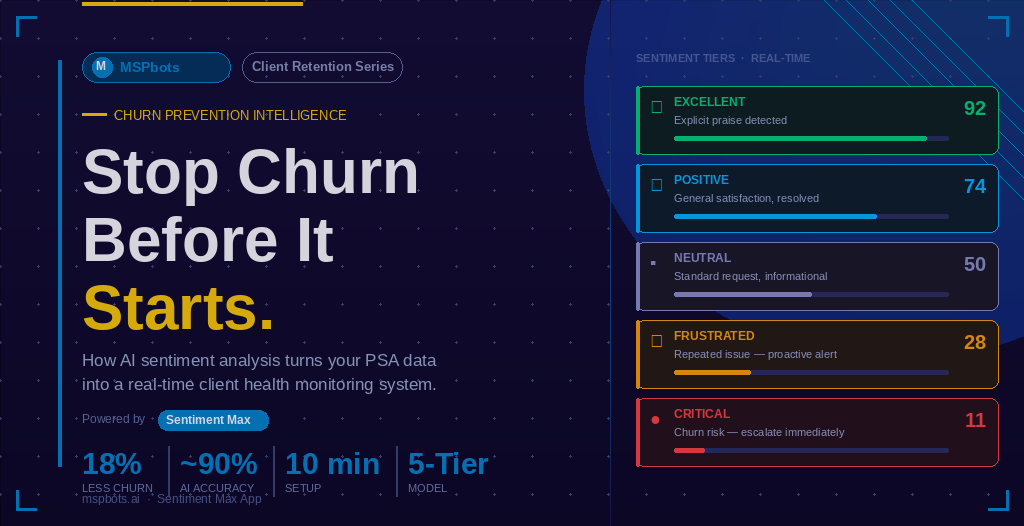
Most sentiment tools give you three buckets: positive, neutral, negative. Sentiment Max goes further with a 5-tier classification model that breaks down emotional tone with significantly more precision. The five tiers are:
- Excellent — Explicit praise, enthusiastic satisfaction, strong advocacy
- Positive — General satisfaction, appreciation, smooth interactions
- Neutral — Standard requests, informational exchanges, closed conversations
- Negative (Frustrated) — Repeated issues, unresolved concerns, mild to moderate dissatisfaction
- Awful (Critical Risk) — Urgent escalation language, high frustration, churn-risk messaging
That granularity matters. A client in the “Frustrated” tier needs a proactive check-in. A client in the “Awful” tier needs your service manager on the phone today. Sentiment Max helps your team triage those situations with precision instead of treating all negative sentiment the same way.
Zero Setup. Real Results in About 10 Minutes.
One of the biggest barriers to adopting new MSP tools is setup complexity. Sentiment Max eliminates that barrier. Unlike earlier versions of the MSPbots sentiment app that required configuring an external OpenAI API key, Sentiment Max uses a centralized AI model — meaning there’s nothing to configure on the AI side. Most MSPs are fully operational in about 10 minutes. Connect your PSA, enable note syncing, and your sentiment dashboard is live.
Sentiment Max integrates natively with ConnectWise Manage and Autotask PSA, which covers the vast majority of MSPs currently using a PSA platform. The system scans every ticket note in real time and immediately highlights sentiment trends across your client base.
🎯 Key Feature: Sentiment Max achieves approximately 90% accuracy on ticket sentiment classification — placing it among the highest-accuracy tools in this category. Accuracy continues to improve as your team reviews results and provides feedback.
What Sentiment Max Does That Changes Your Workflow
Here’s what happens after Sentiment Max is running in your environment:
- Real-time sentiment scanning of every ticket note as it’s created
- Automatic flagging of Negative and Awful-tier tickets with actionable alerts
- Microsoft Teams notifications for critical sentiment events, so your service manager hears about it immediately
- Confidence scoring (0–100) so your team knows how reliable each classification is
- AI-generated action suggestions for each flagged ticket — whether to escalate, assign a senior tech, or initiate client outreach
- PSA write-back: sentiment data written directly into a custom field in ConnectWise or Autotask for tracking and reporting
- Full sentiment trend dashboards showing patterns by client, technician, ticket board, and time period
And for MSPs using MSPbots’ native dispatcher Next Ticket, sentiment data can feed directly into ticket prioritization rules — so tickets carrying high frustration get elevated in the queue automatically.
How MSP Sentiment Analysis Prevents Churn (With Real Numbers)
From Reactive to Proactive: The Fundamental Shift
Before sentiment analysis, service managers catch at-risk relationships the hard way — a client mentions it in a QBR, someone complains on a call, or the cancellation notice lands in the inbox. The intervention comes after the relationship has already eroded.
With real-time sentiment tracking, the intervention happens at the right moment: when frustration is building but the client hasn’t made a decision yet. That window is precious, and most MSPs are currently missing it entirely.
What MSPs Are Seeing in Practice
Early users of the MSPbots AI Sentiment Analysis platform have reported significant operational and retention improvements. Based on data shared by MSPbots from active users:
| Metric | Result |
|---|---|
| Resolution time for flagged negative tickets | 50%+ faster |
| Reduction in manual ticket review time | Up to 80% less |
| Decrease in churn for MSPs using proactive sentiment response | Up to 18% reduction |
| Time to get fully set up | Approximately 10 minutes |
| Sentiment classification accuracy | ~90% |
Source: MSPbots internal user data, Sentiment Max platform
Turning Positive Sentiment Into Revenue Opportunities
The value isn’t just in catching unhappy clients. Sentiment Max also tracks positive sentiment trends — and that data has its own strategic value. When a client interaction generates “Excellent” sentiment, that’s the right moment to ask for a Google review, request a testimonial, or explore whether they have referral relationships that might benefit from your services.
As one MSPbots user noted: “The positive sentiment tracking has been valuable — when we spot clients giving good feedback, we can proactively reach out to them for Google reviews or customer satisfaction surveys. It helps us identify the right moments to request testimonials, turning happy customers into public advocates.”
That’s a revenue cycle. Sentiment Max doesn’t just help you retain clients — it helps you turn your happiest clients into your most effective sales channel.
How to Get Started With Sentiment Analysis at Your MSP
Step 1: Connect Your PSA
Sentiment Max works directly with ConnectWise Manage and Autotask. The integration is straightforward — connect your PSA, enable ticket note syncing, and the system starts analyzing immediately. No complex AI configuration required.
Step 2: Activate Real-Time Alerts
Configure your Microsoft Teams notification rules for Negative and Awful-tier sentiment. Your service manager should be getting a Teams ping within minutes of a critical sentiment ticket — not finding it during a manual review cycle three days later.
Step 3: Review Your Dashboard Weekly
Use the Sentiment Max dashboard to review sentiment trends by client, technician, and board on a weekly cadence. Look for clients showing a pattern of Negative or Frustrated sentiment over time — those are your at-risk accounts that need a proactive outreach call, not a standard ticket response.
Step 4: Build It Into Technician Coaching
Sentiment data by technician is one of the most powerful coaching tools available to service managers. Identify which technicians consistently generate positive sentiment outcomes and study what they’re doing differently. Use negative sentiment patterns to identify communication gaps and coach proactively — not after a client complaint.
📋 Pro Tip: Track sentiment trends alongside SLA data in your MSP dashboards. A technician who closes tickets on time but consistently generates Negative sentiment is a retention risk you might otherwise miss entirely.
Frequently Asked Questions About MSP Sentiment Analysis
What is MSP sentiment analysis, and how is it different from CSAT?
CSAT (Customer Satisfaction Score) is a metric collected through surveys sent after a service interaction. It captures how a client felt at a single point in time, only when they choose to respond. MSP sentiment analysis is fundamentally different: it continuously evaluates the emotional tone of every ticket note your clients send, in real time, without requiring any action from the client. This means you get a complete, always-on picture of client health rather than a periodic, incomplete snapshot.
Is my client’s ticket data secure with a sentiment analysis tool?
With Sentiment Max from MSPbots, security is built into the architecture. The tool only reads ticket and note text from your PSA. All data is encrypted in transit and at rest, and your data is never used to train public AI models. MSPbots also recommends using Azure OpenAI for enhanced security and seamless Microsoft stack integration for enterprises with stricter compliance requirements.
Can sentiment data integrate with my PSA and ticketing workflow?
Yes — and this is one of Sentiment Max’s strongest features. Sentiment data can be written directly back into a custom “Client Sentiment” field in both ConnectWise Manage and Autotask. This means sentiment history lives inside your PSA alongside your tickets, making it reportable, searchable, and trackable over time. For MSPbots Next Ticket users, sentiment data can also influence ticket prioritization automatically.
How much does Sentiment Max cost?
Sentiment Max is available as part of the MSPbots Pro Bundle with simple, usage-based pricing — you pay only for what you use, with no large upfront commitment. The platform also includes a 120-day money-back guarantee, making it one of the lower-risk additions you can make to your MSP tech stack. Month-to-month pricing means you can start small and scale as your team adopts the workflow.
Stop Reacting to Churn. Start Predicting It.
Your clients are already telling you how they feel — inside every ticket note, every update request, every follow-up message. The question is whether your MSP is listening.
MSP sentiment analysis turns your existing PSA data into a real-time client health monitoring system. It gives your service managers the early warning signals they need to intervene before frustration becomes a cancellation notice. And with Sentiment Max from MSPbots, the barrier to getting started has never been lower — ten minutes to set up, zero AI configuration, and results you’ll see in the first week.
If you’re serious about protecting and growing your MRR, sentiment intelligence isn’t a nice-to-have anymore. It’s a core part of the modern MSP tech stack — right alongside your PSA analytics, technician utilization dashboards, and agreement profitability reporting.
Ready to see Sentiment Max in action? Book a demo with MSPbots today and start catching churn signals before they become cancellations.
Related Topics: MSP business intelligence · PSA analytics · MSP dashboards · MSP KPIs · automated MSP reporting · real-time MSP insights · MSP automation · HaloPSA reporting · technician utilization · agreement profitability · SLA tracking · time entry compliance
